Cost Tracking Admin API Quick Reference
Related:
- Security Configuration - Admin authentication setup
- Monitoring Guide - Dashboard metrics and alerts
- Configuration Guide - Full configuration options
- Z.ai Knowledge Base - GLM pricing reference
Dashboard Visualization
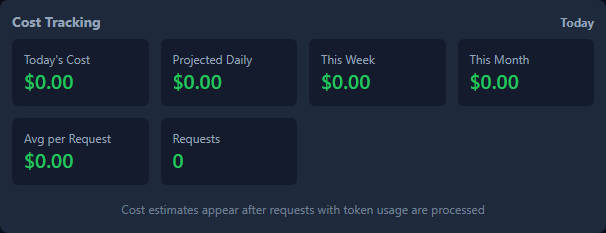
The Cost Panel in the dashboard provides real-time visibility into cost tracking:
Base URL
http://your-server:port/admin/cost-tracking
Authentication
All endpoints require admin authentication when enabled:
# Header-based authentication
curl -H "x-admin-token: YOUR_ADMIN_TOKEN" http://localhost:8080/admin/cost-tracking/config
Endpoints
GET /config
Get current cost tracking configuration.
Response:
rates- Default pricing ratesmodelRates- Per-model pricingbudget- Budget settingssaveDebounceMs- Save debounce delaypersistPath- Persistence file path
Example:
curl -H "x-admin-token: TOKEN" /admin/cost-tracking/config
POST /config
Update cost tracking configuration.
Request Body (all fields optional):
{
  "rates": {
    "inputTokenPer1M": 3.00,
    "outputTokenPer1M": 15.00
  },
  "modelRates": {
    "claude-opus-4": {
      "inputTokenPer1M": 15.00,
      "outputTokenPer1M": 75.00
    }
  },
  "budget": {
    "daily": 100,
    "monthly": 3000,
    "alertThresholds": [0.5, 0.8, 0.95, 1.0]
  },
  "saveDebounceMs": 5000
}
Validation:
- Rates must be non-negative numbers
- Budget thresholds must be 0-1
Example:
curl -X POST \
  -H "x-admin-token: TOKEN" \
  -H "content-type: application/json" \
  -d '{"budget": {"daily": 200}}' \
  /admin/cost-tracking/config
GET /metrics
Get detailed cost tracking metrics.
Response:
{
  "metrics": {
    "recordCount": 1500,
    "saveCount": 45,
    "lastSaveDuration": 12,
    "errorCount": 0,
    "estimatedMemoryKB": 245,
    "currentKeys": 42,
    "currentTenants": 5
  },
  "summary": {
    "periods": { "today": {...}, "thisMonth": {...} },
    "projection": {...}
  }
}
Example:
curl -H "x-admin-token: TOKEN" /admin/cost-tracking/metrics
POST /flush
Force immediate save to disk.
Response:
{
  "success": true,
  "message": "Cost tracking data flushed successfully",
  "timestamp": "2026-02-09T22:00:00.000Z"
}
Use when:
- Before server shutdown
- Before backup
- To ensure data persistence
Example:
curl -X POST \
  -H "x-admin-token: TOKEN" \
  /admin/cost-tracking/flush
POST /reset
Reset all cost tracking data.
⚠️ Warning: Destructive operation, cannot be undone.
Response:
{
  "success": true,
  "message": "Cost tracking data reset successfully",
  "timestamp": "2026-02-09T22:00:00.000Z"
}
Example:
curl -X POST \
  -H "x-admin-token: TOKEN" \
  /admin/cost-tracking/reset
HTTP Status Codes
200- Success400- Bad request (validation error)401- Unauthorized (missing/invalid token)405- Method not allowed500- Internal server error503- Service unavailable (cost tracking not enabled)
Common Operations
Update pricing for a new model
curl -X POST \
  -H "x-admin-token: TOKEN" \
  -H "content-type: application/json" \
  -d '{
    "modelRates": {
      "new-model-name": {
        "inputTokenPer1M": 5.00,
        "outputTokenPer1M": 20.00
      }
    }
  }' \
  /admin/cost-tracking/config
Set daily budget with alerts
curl -X POST \
  -H "x-admin-token: TOKEN" \
  -H "content-type: application/json" \
  -d '{
    "budget": {
      "daily": 100,
      "alertThresholds": [0.5, 0.8, 0.95, 1.0]
    }
  }' \
  /admin/cost-tracking/config
Save data before backup
curl -X POST \
  -H "x-admin-token: TOKEN" \
  /admin/cost-tracking/flush

# Then copy the persist file
cp cost-data.json backup/cost-data-$(date +%Y%m%d).json
Check system health
curl -H "x-admin-token: TOKEN" /admin/cost-tracking/metrics | jq '.metrics'
Error Handling
Validation Error (400)
{
  "error": "inputTokenPer1M must be a non-negative number"
}
Authentication Error (401)
{
  "error": "Authentication required"
}
Service Unavailable (503)
{
  "error": "Cost tracking not enabled"
}
Best Practices
Security: See Security Configuration for token management best practices.
- Always authenticate - Use admin tokens for all requests
- Validate changes - Check config after updates
- Flush before shutdown - Ensure data persistence
- Monitor metrics - Check metrics regularly for issues
- Backup before reset - Always backup before destructive operations
- Use thresholds wisely - Set alerts at appropriate levels
Security Notes
- All endpoints require admin authentication when enabled
- Sensitive operations (flush, reset) require POST method
- Input validation prevents malformed configuration
- All configuration changes are logged
- Rate limiting applies to prevent abuse